DIY Keyboard
- 4.6
- Rating
- 50.00M
- Installs
- Free
- Price

 Analysis by App-foxy
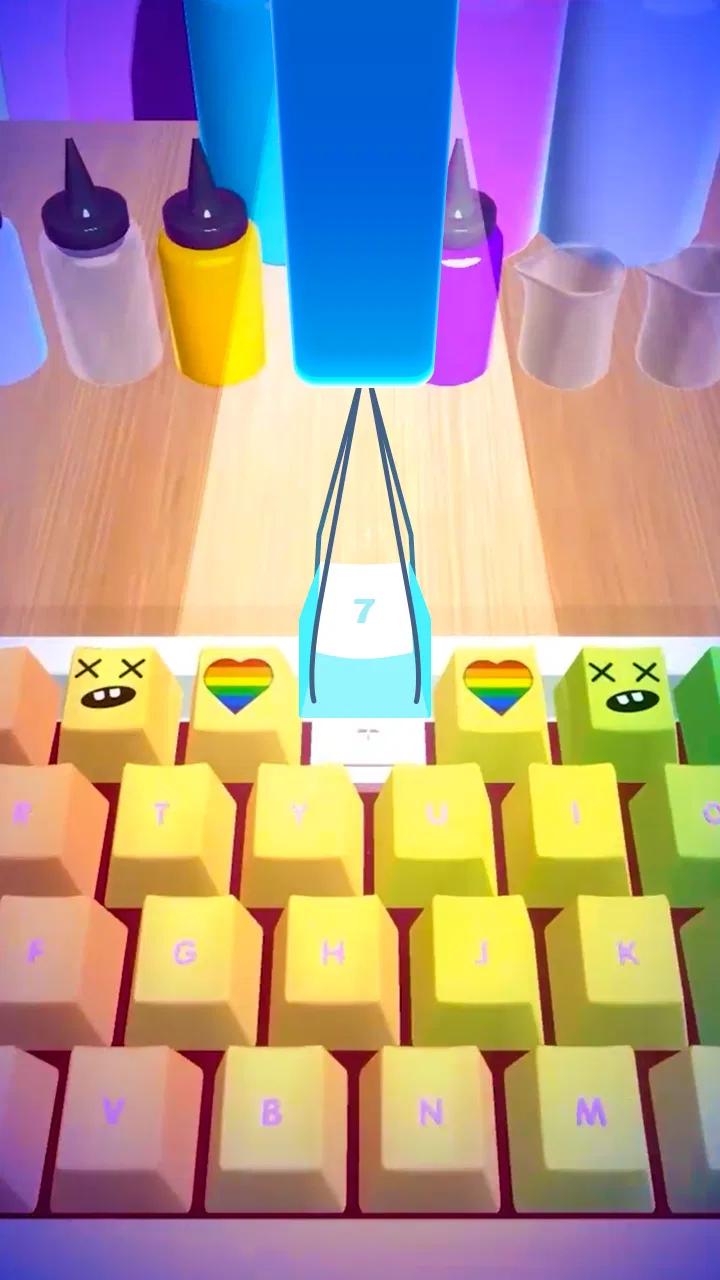
I tried DIY Keyboard as a light simulation game rather than as a serious keyboard-design tool, and that distinction matters from the first few minutes. The basic appeal is simple: you work through a creative keyboard-making experience, choosing visual details and watching a plain input device become something more personal. It is the sort of game I can imagine opening when I want a short, low-pressure activity instead of a demanding strategy game or a competitive match.
That casual focus is also the reason I would not recommend it to everyone. If you want a real keyboard customizer, a detailed electronics simulator, or a game built around deep long-term planning, this is not the right destination. If you enjoy tidy visual tasks, customization, and the satisfaction of completing small design steps, it has a much clearer purpose. I found the best way to approach it was as a relaxing creative toy with progression, not as a technically accurate lesson in how keyboards are built.
What the game feels like in everyday use
The game belongs to the simulation category, but its simulation is presented in a very approachable way. Instead of asking me to understand complicated hardware terminology, it turns the keyboard theme into a sequence of accessible creative actions. The store summary describes the experience as making a custom keyboard through keyboard art, and that is a fair way to understand its identity without expecting professional-level design controls.
You May Also Like

 Blood Strike: 2.5 Anniversary
Blood Strike’s Loadouts Turn Every Drop Into a Tactical Gamble
A close look at Blood Strike’s custom loadouts: how fast access to signature weapons reshapes its battle royale rhythm, rewards preparation, and narrows the gap between fights.

 Pandora - Music & Podcasts
Pandora’s Music Is Easy to Start, but Harder to Recover
Pandora’s strength is its low-effort path from a seed to a station. Its weak spot is how much confidence it asks you to place in connection, setup, and quiet recovery.

 8 Ball Pool
 Is Built on Rivalries, Rematches, and Routine
A close look at the rivalries, rematches, shared routines, and unanswered safety questions that turn a quick pool match into a persistent mobile community.

 Samsung Music
’s Quiet Strength Is Playing What You Already Own
Its reach comes less from spectacle than from dependable access to a personal library. That simplicity is both the app’s strongest retention engine and its ceiling.

 AccuWeather: Weather Radar
AccuWeather Review: A Quick, Clear Forecast for Everyday Decisions
For everyday plans, the best forecast is the one you can understand quickly. AccuWeather makes rain timing, radar, and local conditions easy to act on, with a few trade-offs.

 Hill Climb Racing
Why Hill Climb Racing Still Turns Crashes Into One More Run
A tiny car, a bumpy hill and one more upgrade: Hill Climb Racing keeps resurfacing because its simple chaos makes every near-miss feel personal.
More From Our News Desk
View All News


In practical terms, I see it working well during small gaps in the day. Imagine waiting for a bus, taking a break between study sessions, or sitting on the sofa while you want something interactive but not mentally heavy. I can open a level, concentrate on the visual task, finish a short piece of progress, and put the phone away without needing to remember a complex story or a large set of controls.
The biggest strength is its immediate readability. The keyboard theme gives every action a recognizable purpose, so the game does not need a long explanation before it becomes understandable. That helps younger players and anyone who prefers visual interaction over text-heavy instructions. The content rating is Everyone, which also makes it easier to consider as a family-friendly casual game, although an adult should still make their own judgement about whether the style suits a particular child.
CrazyLabs LTD is the developer behind the game, and the title has clearly reached a broad mobile audience. It has passed 50 million installs and holds a 4.6 average from around 192 thousand ratings, with roughly 1.6 thousand written reviews. Those figures do not prove that every player will enjoy the same parts of it, but they do suggest that the central idea is easy for a large number of people to understand.
The first sessions are about control, not mastery
My early impression was that the game is designed to make progress feel approachable. The keyboard is a familiar object, so the visual feedback has an advantage that many simulation games lack. I do not need to learn an imaginary world before I can appreciate a change. A small design decision is visible immediately, which gives each action a clear sense of completion.
That accessibility can also make the opening feel less demanding for experienced players. Someone looking for a difficult puzzle may find that the game offers more relaxation than challenge. I would describe the initial experience as guided creativity: the game gives me a framework, and I make choices inside it. That is enjoyable when I want structure, but less satisfying when I want complete freedom.
A useful personal approach is to treat each session as a single design exercise rather than rushing through it. I pay attention to how different visual choices work together, especially when the screen becomes busier. This makes the experience feel less like tapping through instructions and more like making a small object with a consistent style. It is a modest difference, but it helps the game retain interest after the novelty of the keyboard theme wears off.
Progression can be pleasant, but pressure changes the mood
Any game built around repeated creative tasks has a natural tension between calm play and completion pressure. At first, I enjoy the simple rhythm of making progress. After several similar activities, I become more aware of whether the game is rewarding my choices or merely asking me to repeat a familiar pattern. That is where personal tolerance matters: players who like short, predictable goals may feel comfortable, while players who need constant mechanical variety may lose interest sooner.
I also think about spending whenever a free mobile game encourages me to keep moving forward. DIY Keyboard is free to download, which removes the initial barrier to trying it. However, “free” should not automatically be read as “every part of the experience is free” or “there is no pressure to spend.” I do not treat an unpaid download as a guarantee about optional purchases, advertisements, or progression conditions. Before spending, I would check the current in-game prompts and the platform’s purchase confirmation carefully.
That is not a criticism based on an invented price or a claim about a particular offer. It is simply the sensible way to judge a free-to-play game. If a purchase appears, I would ask myself whether it improves the creative activity or only removes a temporary obstacle. For this kind of casual title, I would personally keep spending conservative. The core appeal is short-form customization, so I would not pay repeatedly just to make a small session feel less repetitive.
The game is currently listed as version 2.2.2.7 and supports devices running Android 7.0 or later. That makes the compatibility requirement fairly approachable for many Android users, but I would still check the device’s available space, performance, and store compatibility before installing. A minimum operating-system requirement does not promise identical smoothness on every phone, especially when devices differ in age and hardware.
Fairness is more important than the keyboard theme suggests
There is no competitive leaderboard experience at the center of my review, so I would not judge this game by the same standard as a multiplayer battle or a ranked strategy title. For me, fairness here means whether progress feels understandable and whether spending appears to change the creative experience in a way that makes free play feel unnecessarily restricted.
The keyboard concept creates a useful expectation: I want my choices to matter visually. If I spend time selecting a style, arranging a design, or completing a task, the result should feel connected to what I did. That connection is more important than having a large number of decorative options. A smaller set of meaningful choices can feel fairer than a huge collection where the player is constantly pushed toward another unlock.
My advice is to watch the relationship between effort and reward during the first longer session. If ordinary play gives enough variety to keep the design process enjoyable, there is little reason to spend. If the game repeatedly interrupts the creative flow with pressure, I would consider that a sign to reduce playtime rather than automatically reaching for a purchase. The best version of this experience should make me want to experiment, not make me feel that I must pay to avoid frustration.
This is also where DIY Keyboard differs from the usual alternatives in the simulation category. A conventional management simulator may focus on money, schedules, staff, production chains, or optimization. A more technical keyboard app would focus on layouts, components, compatibility, and real-world configuration. This game sits between those ideas only in theme. It uses the familiar object of a keyboard to create a casual art-and-progression experience, so it is better for visual satisfaction than for learning how to build or program one.
Three ways to get more from the creative loop
My first tip is to make a style decision before starting a task. Rather than choosing each element in isolation, I think about whether I want the result to feel clean, playful, bold, or restrained. This gives the activity a small design goal and makes the final result more rewarding. It also prevents the common problem of tapping through every option without noticing how the choices relate to one another.
My second tip is to use the game as a short reset instead of an endless background activity. A ten-minute break with a clear stopping point can feel refreshing; repeated sessions played only to chase the next reward can make the same actions feel mechanical. Because the central idea is easy to understand, the game does not need a long commitment to be enjoyable. I would rather leave after a satisfying design than continue until the keyboard theme feels like a chore.
My third tip is to compare the result with the process. If I enjoy selecting and shaping the keyboard more than I enjoy unlocking the next stage, I focus on the creative moments and ignore the urge to rush. If I enjoy progression more than decoration, I keep expectations realistic and treat the visual work as the route forward. Recognizing which side I prefer helps me decide whether the game is genuinely holding my attention or simply filling time.
Who should install it, and who should skip it?
I would recommend it to players who enjoy casual simulation games with a strong visual theme, especially people who like customizing objects without dealing with complicated controls. It may also suit families looking for an Everyone-rated game that is easy to explain. Someone who likes tidy, repetitive tasks and small moments of completion will probably understand the appeal quickly.
I would skip it if my goal were to learn mechanical keyboard construction, understand switch technology, create a usable phone keyboard, or design a real layout for everyday typing. The game’s keyboard subject should not be confused with a practical keyboard utility. It is also a weak choice for anyone who needs a deep economy, difficult puzzles, competitive fairness, or a substantial narrative. Those players would be better served by a more specialized simulation or a focused creative tool.
Another trade-off concerns replay value. The theme is distinctive enough to attract attention, but a single object can limit variety if the available activities begin to feel too similar. I would not install it expecting the open-ended possibilities of a full design program. I would install it because the narrow theme makes a familiar object playful and because I want quick creative tasks that are easy to understand.
What I would check before committing time or money
The game is free, so trying it is relatively straightforward. My own checklist would be simple: confirm that the device meets the Android requirement, begin without spending, and observe whether the first sessions feel relaxing or pressuring. I would also pay attention to how often the game breaks the creative flow and whether the rewards make me want to continue for the right reasons.
I would not assume that the large install count or high average rating guarantees a perfect fit. Those figures show popularity and broad approval, but casual games often divide players according to tolerance for repetition, advertising, and progression friction. A player who gives a game a short trial may love its immediate visual feedback, while another may find the same simplicity too limited.
The same applies to updates. The current version is useful when checking compatibility, but it should not be treated as a promise that every device will behave identically. If the game runs poorly or feels uncomfortable on a particular phone, I would not force the experience simply because other players enjoy it. The right test is whether it works smoothly enough for the short, relaxing sessions it is meant to support.
I also appreciate that the game’s age category keeps the basic audience broad, but parents should still take an active look at the device’s purchase settings. A child-friendly content rating does not by itself answer questions about spending or screen-time habits. For a shared phone or family tablet, I would use purchase confirmation and agree on limits before handing the game over.
My final view after weighing the trade-offs
DIY Keyboard is most successful when I treat it as a compact creative simulation, not as a serious keyboard application and not as a demanding management game. Its familiar subject makes the interaction easy to understand, while the design focus gives ordinary tapping a visible purpose. I like that I can approach it casually, make a little progress, and stop without carrying a complicated system in my head.
Its limitations are equally clear. The narrow theme may not provide enough variety for players who need constant new mechanics. The free-to-play context deserves a careful look before spending, and the game should not be mistaken for a tool that creates a functional custom keyboard. Those are not minor details; they define whether the experience feels appropriate.
With a 4.6 average and over 50 million installs, it is easy to see why the concept has attracted attention. Still, my recommendation is based less on popularity than on fit. I would suggest trying it if you want an Everyone-rated, free casual game centered on visual keyboard customization and short creative tasks. I would skip it if I wanted technical accuracy, deep simulation, or a completely pressure-free guarantee around purchases.
My trust verdict is therefore positive but measured: try it for the creative loop, keep spending deliberate, and judge the progression by how it feels rather than by its popularity. For the right player, it is a pleasant way to turn a familiar everyday object into a small design playground. For everyone else, its simplicity may become the reason to move on.
FAQs for DIY Keyboard
01What is DIY Keyboard and how does it work?
DIY Keyboard is a customizable keyboard app that allows users to design their own keyboard layouts and themes. It works by providing a variety of tools and options to personalize the appearance and functionality of your keyboard. Users can choose from different fonts, colors, and backgrounds, enhancing their typing experience according to their preferences.
02Is DIY Keyboard free to use, or are there any in-app purchases?
DIY Keyboard is free to download and use, offering a basic set of features without any cost. However, it does include optional in-app purchases. These purchases can unlock additional themes, advanced customization options, and other premium features. Users who want more personalization options might consider these upgrades.
03Does DIY Keyboard support multiple languages and how do I switch between them?
Yes, DIY Keyboard supports multiple languages. Users can easily switch between languages by navigating to the app’s settings and selecting their preferred languages. This feature is particularly beneficial for multilingual users who require seamless switching between different language keyboards while typing.
04How does DIY Keyboard ensure user privacy and data security?
DIY Keyboard prioritizes user privacy by implementing strict data security measures. The app does not collect or store any personal or sensitive information like passwords or credit card details. Users can feel secure knowing that their typing data is not being tracked or shared with third parties.
05Can DIY Keyboard affect the performance or battery life of my device?
While DIY Keyboard is designed to be efficient and lightweight, like any app, it may have a slight impact on your device's performance and battery life, especially if you use resource-intensive themes or features. However, most users find this impact minimal and not disruptive to their overall device functionality.
Pros
- Highly customizable layouts and designs.
- Intuitive interface for easy use.
- Wide variety of key themes available.
- Smooth performance with no lag.
- Regular updates with new features.
Cons
- Limited free options
- many are paid.
- Occasional ads can interrupt usage.
- Some layouts may feel cluttered.
- Initial setup can be time-consuming.
- Requires internet for full access.

DIY Keyboard
Gallery